As an Amazon Associate I earn from qualifying purchases. This page contains affiliate links, and I may earn a commission at no extra cost to you.
The Screen-Free Coding Dilemma: Remote Logic vs Mechanical Assembly
Buying an educational STEM toy shouldn't require handing a five-year-old an iPad, creating a mandatory cloud account, or spending forty minutes troubleshooting Bluetooth pairing on Christmas morning. The promise of early robotics is supposed to be hands-on computational thinking: sequencing, algorithmic logic, spatial reasoning, and debugging tangible mistakes on the living room rug.
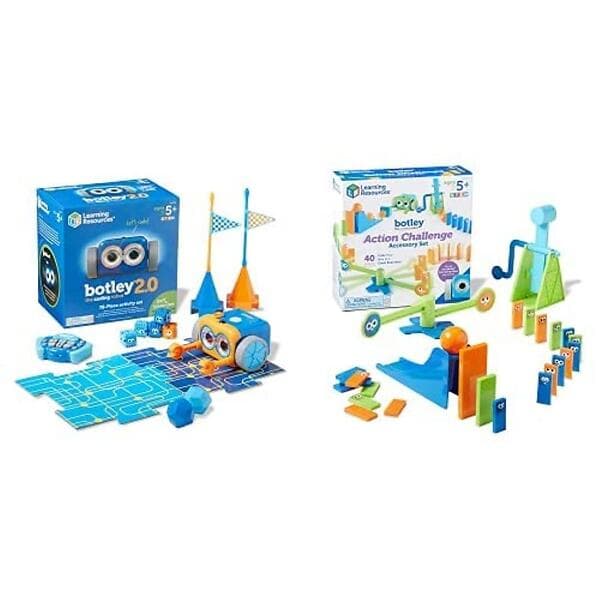
Yet the market splits dramatically into two competing philosophies. On one side stands the Learning Resources Botley 2.0 The Coding Robot Activity Set, a Bett Award-finalist system built strictly around a dedicated handheld remote control, zero screens, and instant plug-and-play challenges. On the other stands the Clementoni Mio The Robot Next Generation, a build-it-yourself robotics kit that blends physical assembly, motor gears, on-board push-button programming, and optional app-based extensions.
Both sit in the accessible mid-range price bracket (typically £30 to £85 depending on bundle tiers), but they serve fundamentally different types of young learners. If you purchase the wrong one, you will end up either with an over-complicated box of plastic gears that a younger child abandons in frustration, or a pre-built unit that an older, mechanically minded child masters in an afternoon. This guide breaks down the real-world build quality, battery demands, coding depth, and classroom-to-home longevity of both flagship platforms alongside their closest category alternatives.
Quick Comparison: Screen-Free Coding Robots at a Glance
The table below summarises the primary specifications, design philosophies, and ideal age ranges across all six models featured in this guide.
| Product | Key Specs & Architecture | Price Band | Our Verdict | Link |
|---|---|---|---|---|
| Learning Resources Botley 2.0 Activity Set | Up to 150 coding steps, dedicated remote, 78-piece obstacle kit, 5x AAA | Mid-range | The undisputed gold standard for pure, screen-free computational logic for ages 5–8. | See it on Amazon |
| Clementoni Mio The Robot Next Generation | Full self-assembly, 2x IR obstacle sensors, microphone, marker/magnet holders | Budget to Mid-range | Superb physical mechanics and maker satisfaction for builders aged 8 and up. | See it on Amazon |
| Learning Resources Code & Go Robot Mouse | Rechargeable battery (USB), on-board arrow grid, 30 coding cards | Budget to Mid-range | Best standalone entry point for younger reception and Year 1 learners. | See it on Amazon |
| Learning Resources Botley 2.0 Solo | Robot unit + remote programmer only (no obstacle tiles), 5x AAA | Budget | Great cost-effective option if you already have floor mats and household obstacles. | See it on Amazon |
| Clementoni Science & Play Mio Robot | Classic build-your-own robot chassis, magnetic arm, backpack push buttons | Budget | A classic mechanical build project focusing heavily on motor linkages and hands-on assembly. | See it on Amazon |
| TTS Bee-Bot Rechargeable Floor Robot | Rugged school-grade chassis, 40-step memory, directional buttons, USB charging dock | Premium | Classroom legend with unbeatable durability, though priced primarily for institutional budgets. | Check price Only from other sellers, price varies |
Head-to-Head: Learning Resources Botley 2.0 vs Clementoni Mio
To understand which robot suits your recipient, you must first understand the fundamental divide between computational sequencing and mechanical engineering.
1. Setup Friction and Out-of-Box Readiness
If your goal is immediate play within three minutes of unwrapping, the Learning Resources Botley 2.0 The Coding Robot Activity Set wins without contest. Botley arrives fully assembled. You unscrew two battery compartments (three AAA batteries in the robot, two AAA in the remote), slide the power switch on, and hand the remote to the child. There are no app stores to visit, no firmware updates to sync, and no fragile snap-fit cogs to misalign.
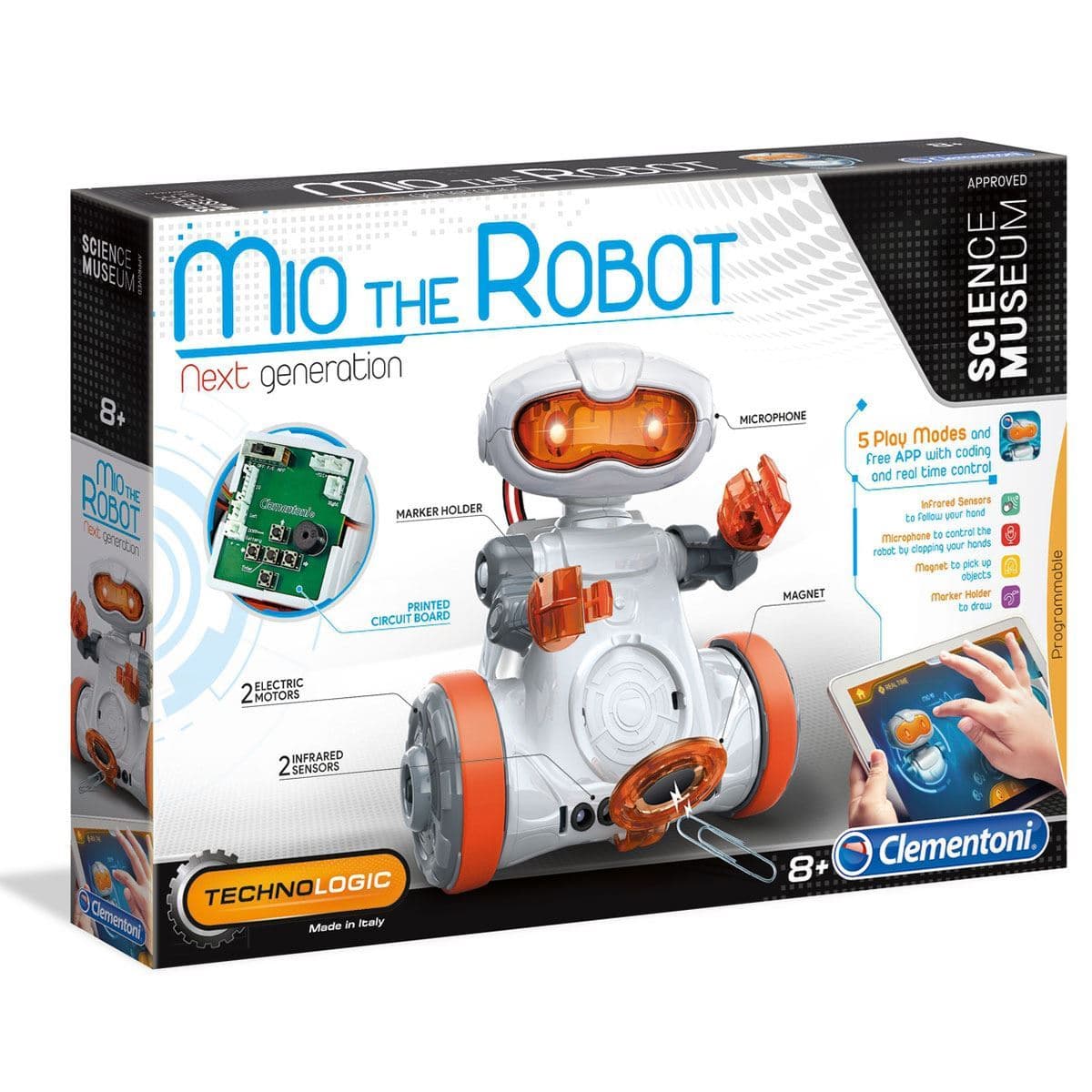
The Clementoni Mio The Robot Next Generation takes the polar opposite approach. Mio is a construction project first and a programmable robot second. Before any coding takes place, the child (often with significant adult assistance) must assemble the chassis, route the electrical wiring to the printed circuit board, snap together the reduction gearboxes, and mount the rubber tracks. For an 8- or 9-year-old who loves Meccano or technical Lego, this is half the thrill. For an impatient 5-year-old, it is a recipe for tears while a parent spends an hour squinting at exploded-view diagrams.
2. Coding Depth and Interface Philosophy
Botley 2.0 operates via a tactile, dedicated Remote Programmer. Children press directional arrows (Forward, Back, Left Turn, Right Turn), set light sequences, input loops, and queue up to 150 individual commands before pressing "Transmit". The remote sends the entire instruction string via infrared to Botley's receiver eyes. It also features 16 secret code modes where specific input sequences transform Botley into a police car, a train, or a ghost with custom light patterns and sounds. It teaches sequencing, subroutines, and debugging precisely as modern computer science curricula dictate.
Clementoni Mio relies on a push-button panel mounted on its "backpack" for basic manual routing, alongside dual infrared sensors for line-following and obstacle avoidance. However, Mio's deeper coding features rely on an optional smartphone or tablet app that introduces visual block-based programming (similar to Scratch). While this provides a pathway into digital coding languages, it breaks the strictly "screen-free" premise that many parents actively seek.
3. Sensor Intelligence and Interactive Play
Where Clementoni Mio excels is sensory hardware. It includes two infrared proximity sensors that allow it to follow a child's moving hand like a pet or navigate around furniture autonomously. It also features a built-in microphone that responds to sound triggers (clapping hands to start or turn) and physical accessory attachments—including an arm that holds standard felt-tip markers to draw geometric shapes, and a magnetic search head for picking up paperclips.
Botley 2.0 counters with object-detection sensors embedded in its front grill. If Botley encounters an obstacle during an executed code sequence, it will pause, light up, and play an alert sound until the path is cleared. Botley also includes a dedicated black-line tracking sensor on its underside, allowing it to follow user-drawn sharpie lines or the included modular track tiles seamlessly.
Detailed Product Breakdowns
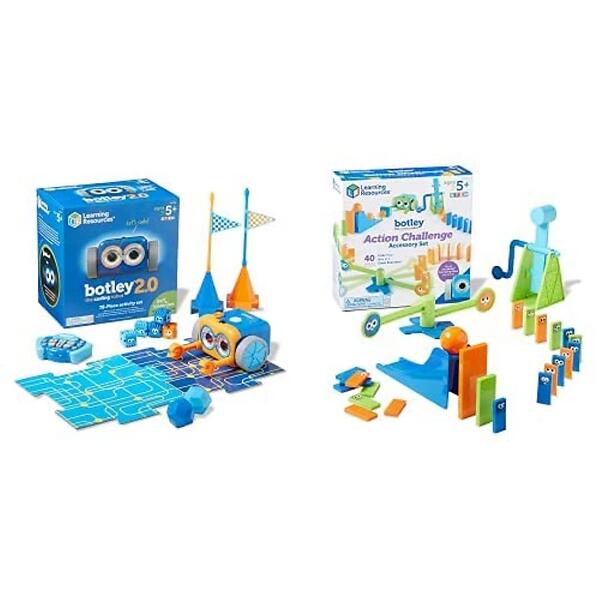
1. Learning Resources Botley 2.0 The Coding Robot Activity Set
The flagship 78-piece activity set is the most comprehensive early-years coding bundle currently available for the home. Learning Resources specifically engineered Botley to bridge the gap between nursery floor toys and complex primary school computing lessons.
The build quality is exceptional: chunky, drop-resistant ABS plastic that withstands regular carpet drops and accidental kicks. The remote programmer features large, distinctively coloured directional keys that correspond to the 40 physical double-sided coding cards provided in the box. This physical-to-digital mapping allows children to map out their logic on the carpet first, verify the sequence, and then key it into the remote.
The obstacle pieces—comprising plastic cubes, cones, flags, and snap-on robot arms—turn abstract logic into tangible physical problem solving (e.g., "Code Botley to navigate around the cone, push the orange ball into the goal zone, and flash green").
The main drawback is battery consumption. Running 5 AAA batteries across two devices means heavy users will want to invest in rechargeable cells to avoid ongoing maintenance costs.
2. Clementoni Mio The Robot Next Generation
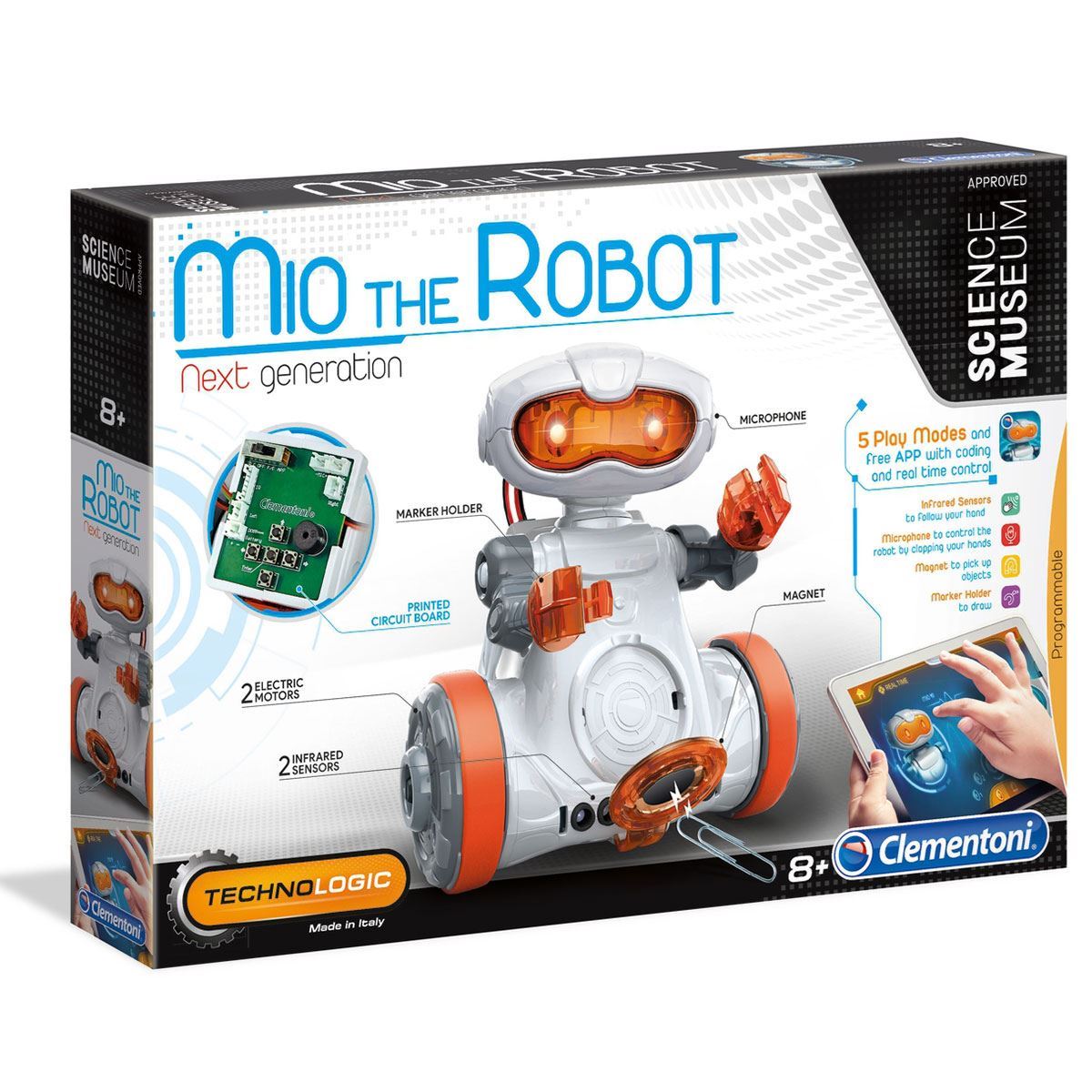
Designed and manufactured in Italy, the Mio Next Generation is an impressive hybrid of robotics, mechatronics, and software coding. Unlike standard pre-moulded toys, building Mio gives children a genuine visual understanding of how an electric motor transfers rotational force through a series of reduction gears to drive axles and wheels.
The twin infrared sensors offer genuine robotics experimentation. Children can switch Mio into "search" mode, where it navigates complex obstacle courses autonomously, or "follow-me" mode, tracking an outstretched palm across a table. The magnetic accessory head is a brilliant addition that lets children stage metal-retrieval challenges.
However, build tolerance requires care. If a gear is seated slightly askew or a wire is pinched during casing closure, the robot will drift or stall, requiring full disassembly to fix. It is best suited for patient, inquisitive children aged 8 and up who genuinely enjoy the process of mechanical construction.
3. Learning Resources Code & Go Robot Mouse Activity Set
For children aged 4 to 6 who find Botley's multi-step remote a touch too abstract, the Code & Go Robot Mouse (featuring Jack or Colby the mouse) is the most intuitive stepping stone available. There is no external controller: all directional buttons sit directly on top of the mouse's back.
Children lay out the included grid maze tiles, place plastic wall barriers and a plastic wedge of cheese, and physically press the sequence (e.g., "Forward, Forward, Right Turn, Forward") directly into the toy. Pressing the large green "Go" button executes the sequence across the grid.
The modern version includes a built-in rechargeable battery via USB, completely eliminating the battery-replacement headache seen on older models and entry-level competitors.
4. Learning Resources Botley 2.0 Coding Robot (Solo Unit)
If you love the architecture of Botley 2.0 but want to keep costs firmly in the budget tier, Learning Resources sells the standalone Botley 2.0 robot and remote programmer without the large cardboard storage box and 78-piece obstacle set.
You retain the exact same 150-step memory, light-up night vision modes, sound interactions, line-following sensors, and secret vehicle transformations. The only difference is that you provide your own obstacles—using wooden building blocks, cardboard boxes, and household toys instead of the plastic grid accessories.
For families with limited shelf space or parents who already own plenty of craft materials, this solo pack represents exceptional value for money.
5. Clementoni Science & Play Mio Robot
This classic iteration of the Science & Play Mio chassis focuses almost exclusively on mechanical assembly, circuit completion, and physical manipulation. It strips away the digital app layers in favour of pure physical backpack push-button programming and manual sensor routing.
Equipped with a mechanical arm and magnetic retrieval head, this kit is frequently favoured by secondary STEM clubs and holiday workshops as an affordable introduction to robotics hardware. While its memory buffer is far smaller than Botley's 150 steps, it teaches gear ratios, circuit paths, and motor polarity far better than any sealed unit can.
6. TTS Bee-Bot Rechargeable Floor Robot
If you have visited a UK primary school or nursery reception class in the past decade, you have almost certainly seen the yellow-and-black striped TTS Bee-Bot. It is the industrial workhorse of the early-years curriculum.
Featuring seven ultra-durable membrane buttons on its top shell, Bee-Bot allows children to sequence up to 40 commands in precise 15cm forward/backward increments and 90-degree rotations. It is engineered to withstand years of being dropped on parquet flooring, stepped on by toddlers, and shared among dozens of pupils. It charges via a heavy-duty USB base station.
The only reason it does not take our top consumer recommendation is the commercial pricing: sold primarily for educational institutions (frequently in multi-packs), individual units carry a premium price tag compared to consumer-focused retail alternatives like Botley.
Check price Only from other sellers, price varies
Setup, Durability, and Longevity: What Real Owners Experience
When selecting between these systems, look past the front-of-box marketing claims and consider the practical day-to-day realities of living with these toys.
Battery Management and Power Draw
One of the most persistent owner complaints across early robotics toys is unexpected battery drain. Botley 2.0 features an automatic sleep mode to conserve energy, but because it relies on 5 AAA batteries distributed between the chassis and transmitter, leaving standard alkaline batteries inside for months of disuse can lead to leakage or rapid depletion. We strongly advise pairing Botley with a 4-pack or 8-pack of quality NiMH rechargeable AAA batteries.
By contrast, the modern Learning Resources Code & Go Robot Mouse and the TTS Bee-Bot Rechargeable Floor Robot Only from other sellers, price varies feature integrated lithium-ion cells that recharge via standard USB cables, saving considerable long-term expense.
Floor Surface Compatibility
Both Botley 2.0 and Clementoni Mio perform best on smooth hard flooring (wood, laminate, vinyl, or tiled surfaces) or very low-pile commercial carpet tiles. On thick, plush pile domestic rugs, Botley's wheels will slip, throwing off the precise 90-degree turn angles and distance calibrations required to complete structured maze challenges. Clementoni Mio's rubber tracks handle uneven surfaces marginally better, but deep carpets will jam its low-slung reduction gear housing.
Alternatives to Consider
If neither the pure remote sequencing of Botley nor the complex gear assembly of Clementoni Mio matches your requirements, consider these two alternative directions:
- For Younger Learners (Ages 4 to 6): Choose the Learning Resources Code & Go Robot Mouse Activity Set. It provides the same foundational sequencing logic as Botley but integrates buttons directly on the chassis and includes a rechargeable battery, removing the abstraction of a remote control.
- For Classroom-Grade Indestructibility: If your priority is a bulletproof educational tool that will survive heavy multi-child use for five or more years, the institutional TTS Bee-Bot Rechargeable Floor Robot Only from other sellers, price varies remains unmatched in mechanical reliability.
Final Verdict: Which Screen-Free Robot Should You Buy?
For 90% of families looking for an engaging, truly screen-free educational gift for children aged 5 to 8, the Learning Resources Botley 2.0 The Coding Robot Activity Set is our clear overall winner. It requires zero setup friction, removes tablets entirely from the equation, offers a massive 150-step memory buffer with progressive coding challenges, and survives the rough-and-tumble of domestic family life.
Reserve the Clementoni Mio The Robot Next Generation for older children (ages 8+) who actively want to pick up a screwdriver, learn how gear trains function, and experiment with hardware sensors and mechanical add-ons.