As an Amazon Associate I earn from qualifying purchases. This page contains affiliate links, and I may earn a commission at no extra cost to you.
Buying a gaming headset as a gift sounds straightforward until the recipient unpacks it and discovers it refuses to output audio from their Xbox, or the transmitter blocks the adjacent charging port on their PlayStation 5. The consumer audio market is full of packaging stamped with the words 'multi-platform', yet beneath that marketing label lies a technical barrier that trips up thousands of shoppers every year.
Sony, Nintendo, and PC manufacturers embrace open USB audio standards. Microsoft does not. Because Xbox consoles require a proprietary security handshake over 2.4GHz wireless frequencies, a standard USB transmitter that functions instantly on a PC or PS5 sits completely dead when plugged into an Xbox Series X or Xbox One. If you buy the wrong model, your £80 to £100 investment instantly turns into a single-console paperweight.
This guide looks closely at five established wireless headsets currently occupying the sub-£100 territory. By evaluating transmitter architecture, cross-console convenience, battery durability, and daily comfort, we determine which headsets genuinely serve multi-device living rooms and which ones belong strictly on a single platform.
The Multi-Console Compatibility Matrix
Before examining individual models, it helps to see how the prominent wireless headsets under £100 navigate different platforms. The table below outlines real-world platform support, primary connection methods, and overall value.
| Headset | Primary Wireless | Xbox Support | PS5 & Switch Support | Price Band | Buy |
|---|---|---|---|---|---|
| SteelSeries Arctis Nova 4X Wireless | 2.4GHz USB-C (Quantum 2.0) | Full Wireless (Native) | Full Wireless (USB Switch) | Mid-Range (~£80–£95) | See it on Amazon |
| HyperX Cloud III Wireless | 2.4GHz USB-C / USB-A | No USB Audio | Full Wireless | Mid-to-High (~£90–£100) | See it on Amazon |
| Turtle Beach Stealth 500 | 2.4GHz Wireless + Bluetooth 5.2 | Full Wireless (Xbox Variant) | Bluetooth / PC Only | Budget (~£60–£75) | See it on Amazon |
| Corsair HS55 Wireless | 2.4GHz Wireless + Bluetooth | No USB Audio | Full Wireless | Budget-to-Mid (~£70–£85) | See it on Amazon |
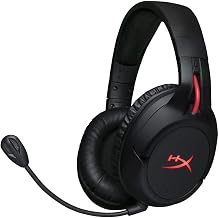
| HyperX Cloud Flight | 2.4GHz USB-A Wireless | No USB Audio | Full Wireless (PS4/PS5/PC) | Budget (~£55–£70) | See it on Amazon |
Why Cross-Platform Wireless Audio Is Complicated
The core problem facing any shopper hunting for a universal wireless headset is Microsoft's hardware licensing. Standard wireless headsets use generic USB audio class (UAC) drivers. Plug a standard UAC dongle into a PlayStation 5, a Nintendo Switch dock, a PC, or a Mac, and the system recognises it instantly as a sound card. Plug that exact same dongle into an Xbox Series X, and the console ignores it entirely because it lacks Microsoft's proprietary security chip.
Headset manufacturers solve this in one of two ways. Some build an Xbox-specific model containing the necessary cryptographic authentication chip and add a physical switch to the wireless transmitter. Toggling that switch changes the dongle from Xbox mode to standard USB mode, enabling the headset to function across Xbox, PlayStation, Switch, and PC without fuss. Other manufacturers simply ignore Xbox compatibility altogether, designing headsets solely for PC and PlayStation users.
If your home features both an Xbox and a PlayStation 5, or if you are purchasing a gift and cannot remember whether the recipient plays on an Xbox Series S or a PS5, picking a headset without an Xbox-certified transmitter is an enormous gamble. Let us examine how the current market options perform against these real-world demands.
SteelSeries Arctis Nova 4X Wireless: The True Cross-Platform Champion
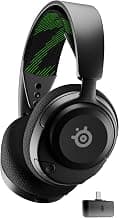
If universal compatibility is your absolute top requirement, the SteelSeries Arctis Nova 4X Wireless represents the benchmark under £100. Note the 'X' suffix carefully: SteelSeries manufactures a Nova 4, a Nova 4P (PlayStation-branded), and a Nova 4X. While the 4P works solely on PlayStation, Switch, and PC, the Nova 4X features a small hardware toggle directly on its compact USB-C transmitter that lets you switch between Xbox communication and standard USB modes.
Setting the switch to 'Xbox' engages the required authentication chip for Xbox Series X|S and Xbox One. Flipping it to 'USB' allows immediate, plug-and-play low-latency 2.4GHz operation on PlayStation 5, Nintendo Switch (both handheld and docked via the included adapter cable), PC, Steam Deck, and Android devices. This single hardware toggle eliminates setup frustration across an entire household of hardware.
Beyond its transmitter flexibility, SteelSeries equipped the Nova 4X with their Nova Acoustic System and custom high-fidelity drivers. On PC, users gain access to the Sonar audio suite, which provides a pro-grade parametric equaliser to adjust frequencies for competitive footsteps or cinematic bass. On consoles, the default sound profile leans balanced and clean, avoiding the muddy, overbearing low-end that plagues cheaper peripherals.
Communications are handled by a fully retractable ClearCast Gen 2 microphone. Unlike detachable booms that get misplaced behind desks or lost in living room couch cushions, the ClearCast capsule slides smoothly into the left earcup when not in use. SteelSeries uses bidirectional noise rejection, and when paired with PC software, employs background-cancelling algorithms to keep keyboard clicks or living room chatter out of party chat.
Battery life reaches a verified 36 hours over continuous 2.4GHz wireless. Even better for forgetful gamers, the USB-C fast-charging system provides roughly six hours of gameplay from a 15-minute top-up. The ski-goggle suspension headband distributes weight evenly across the skull, while the breathable AirWeave memory foam ear cushions prevent heat build-up over multi-hour gaming marathons.
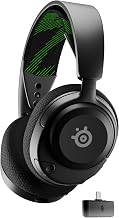
HyperX Cloud III Wireless: Unrivalled Battery Life for Non-Xbox Setups
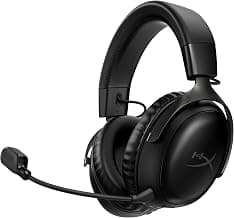
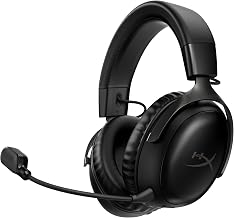
HyperX built an enviable reputation on the foundation of bulletproof build quality and pillow-like comfort. The HyperX Cloud III Wireless upholds that tradition effortlessly, though it comes with a strict platform boundary that every shopper must understand: it does not support Xbox consoles over wireless.
If your household strictly juggles a PlayStation 5, a Nintendo Switch, and a gaming PC, the Cloud III Wireless is one of the most comfortable headsets you can purchase for around £90 to £100. HyperX constructs the frame using a flexible aluminium headband that withstands severe twisting and drops far better than all-plastic alternatives. The ear cushions feature dense memory foam wrapped in plush leatherette, creating a passive acoustic seal that naturally isolates ambient room noise without active electronics.
The engineering standout here is power efficiency. HyperX quotes up to 120 hours of continuous wireless playback on a single charge. For the typical gamer playing two hours an evening, the headset can run for nearly two months before needing a USB-C charging cable. For teenagers or shared family spaces where nobody ever remembers to plug peripherals back into a charger, this extreme battery endurance changes the ownership experience entirely.
Audio reproduction comes via angled 53mm dynamic drivers tuned for positional clarity. Footsteps in tactical shooters and dialogue in story-driven adventures come through crisp and articulate, though bass enthusiasts might find the factory profile slightly restrained compared to punchier bass-heavy sets. The microphone is an upgraded 10mm detachable boom with an internal metal mesh pop filter, offering noticeably fuller vocal warmth than previous Cloud iterations.
Because the Cloud III relies on a standard USB-C dongle (with an included USB-A adapter), it switches cleanly between PS5, PC, and Switch. However, plugging it into an Xbox yields total silence. If Microsoft hardware is not in your home, it is a magnificent piece of kit; if an Xbox is present, it will disappoint.
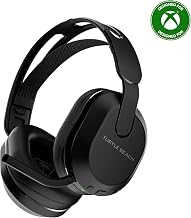
Turtle Beach Stealth 500: Accessible Dual Wireless with Bluetooth Flexibility
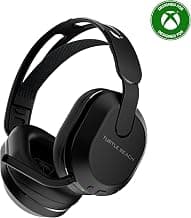
Stepping down the price ladder to roughly £60 to £75 brings you to the Turtle Beach Stealth 500. Turtle Beach has dominated entry-level console audio for decades, and the Stealth 500 represents their contemporary push into lightweight, dual-mode wireless headsets for budget-conscious gamers.
The standout feature on the Stealth 500 is its QuickSwitch technology. The headset houses both low-latency 2.4GHz wireless and Bluetooth 5.2. A dedicated physical button on the earcup allows you to swap instantly between the 2.4GHz transmitter connected to your console and a Bluetooth connection linked to your mobile phone. This enables you to take an incoming phone call or stream music without removing the headset or repairing it to another device.
The specific Xbox-certified variant of the Stealth 500 allows direct wireless connection to Xbox Series X|S and Xbox One, making it one of the most affordable wireless solutions for Microsoft's ecosystem. It also connects seamlessly to PC and mobile. However, unlike the SteelSeries Nova 4X, cross-connecting an Xbox-branded Stealth 500 to a PlayStation 5 is not natively supported over USB wireless, so owners must rely on Bluetooth or secondary connections when moving outside Microsoft's hardware orbit.
Audio performance relies on Turtle Beach's signature 40mm drivers alongside their proprietary 'Advanced Superhuman Hearing' sound mode. This preset boosts the high-frequency acoustic cues associated with weapon reloads, enemy footsteps, and vehicle engines. While it strips away the cinematic warmth of game soundtracks, competitive players who focus heavily on titles like Call of Duty or Apex Legends frequently appreciate the tactical emphasis. The Turtle Beach Swarm II companion app provides access to a 10-band graphic EQ to tame the sound profile to your taste.
Battery life is competitive at up to 40 hours, and the headset features a flip-to-mute omni-directional microphone that integrates seamlessly into the housing. The trade-off comes down to materials: the chassis relies heavily on lightweight plastics that lack the premium aluminium feel of the HyperX Cloud III or the sleek finish of the SteelSeries line.
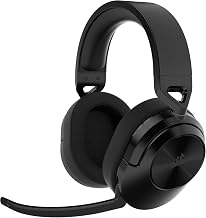
Corsair HS55 Wireless: Featherweight Comfort for Desk and Sofa
Weighing in at just 266 grams, the Corsair HS55 Wireless targets gamers who suffer from neck fatigue during long sessions. Traditional wireless gaming headsets often tip the scales between 300 and 380 grams due to their internal batteries and reinforcement brackets; Corsair managed to shave substantial mass off the HS55 without leaving the frame feeling flimsy.
The HS55 delivers dual-connectivity via low-latency 2.4GHz wireless and Bluetooth. This makes it an exceptional companion for a PlayStation 5 and a Nintendo Switch in handheld mode. On PS5, Corsair specifically tuned the custom 50mm neodymium drivers to support Sony's Tempest 3D AudioTech, delivering convincing spatial positioning in sprawling open-world titles. The flip-to-mute microphone captures speech clearly with minimal room reverberation, and on-ear roller controls let you tweak master volume, sidetone monitoring, and EQ presets on the fly.
However, the Corsair HS55 Wireless shares the same limitation as the HyperX line: it does not communicate with Xbox consoles over 2.4GHz wireless. The USB transmitter is formatted exclusively for standard USB audio platforms (PC, Mac, PlayStation). While you can pair the headset to mobile devices or a Nintendo Switch via Bluetooth, console chat on Xbox remains completely unavailable.
Battery endurance sits around 24 hours over 2.4GHz wireless. While that is more than sufficient for several days of typical use, it trails the 36 hours of the Nova 4X and the monolithic 120 hours of the Cloud III. For PC and PS5 households prioritising a featherweight footprint on their head over multi-day battery marathons, the HS55 represents good value within the £70 to £85 window.
HyperX Cloud Flight: Simple, Time-Tested PlayStation and PC Audio
The HyperX Cloud Flight has been a fixture in budget wireless audio for several years, and it remains in active circulation because its basic formula works reliably. It avoids modern complexities like companion mobile apps, Bluetooth switching, or complex parametric EQs, focusing purely on lag-free 2.4GHz gaming audio for PC and PlayStation platforms.
The build relies on a durable, steel-reinforced adjustable slider with earcups that rotate 90 degrees to rest flat on your collarbones when taking a break. Red LED lighting accents the earcups, though leaving the lighting turned off extends the battery runtime up to roughly 30 hours on a single charge. The detachable noise-cancelling microphone features an intuitive mute mechanism: you simply press the large, rubberised outer faceplate of the left earcup inward to silence your voice.
Just as with the Cloud III, HyperX explicitly states on the packaging that the Cloud Flight is not compatible with Xbox consoles. Its transmitter is an older-style USB-A stick that operates strictly via standard USB class audio on PC, PS4, and PS5. While it does work on docked Nintendo Switch consoles, it lacks the modern USB-C transmitter design needed to plug straight into a Switch in handheld mode without an unwieldy adapter.
If you find the Cloud Flight on discount towards the £55 to £65 mark and your household only plays on PC or PlayStation, it remains a sturdy, hassle-free performer. For anyone needing cross-console flexibility across modern USB-C devices and Xbox consoles, however, its dated interface and strict platform lockouts make newer designs like the Nova 4X substantially more practical.
Transmitter Design: The Hidden Pain Point
When picking a wireless headset for a shared living room, the physical shape of the USB dongle matters almost as much as the wireless chip inside it. Headset manufacturers frequently build wide, horizontal USB-C transmitters that look sleek in marketing renders but cause immediate ergonomic headaches on actual consoles.
Consider the front panel of the PlayStation 5. The console features one USB-C port situated mere millimetres away from a standard USB-A port. If a headset uses a wide T-shaped USB-C transmitter, plugging it into the front USB-C port physically blocks the adjacent USB-A port, preventing you from plugging in a controller charging cable or an external hard drive.
Similarly, on the Nintendo Switch in handheld mode, a wide dongle can poke into your fingers or prevent the console from resting comfortably in certain protective travel cases. The SteelSeries Arctis Nova 4X Wireless bypasses this frustration by keeping its USB-C dongle relatively compact and supplying an extension cable in the box. This cable allows you to plug the dongle into a rear USB-A port on a PS5, Xbox Series X, or PC tower, keeping the front ports free for accessories.
Before buying any headset with a USB-C dongle, verify what cables come included. If a headset only supplies a bare USB-C plug and your primary desktop PC or older console only features USB-A ports, you will need to buy a separate adapter just to establish a connection.
2.4GHz Wireless vs Bluetooth: Why Both Matter
Shoppers often ask why standard Bluetooth headphones—such as those made by Sony, Bose, or Apple—cannot simply serve as gaming headsets across all consoles. The answer comes down to wireless latency and protocol support.
Standard Bluetooth introduces an audio delay ranging anywhere from 100 to 250 milliseconds. In music or movie playback, your phone or television can artificially delay the video track to match the lagging audio, creating the illusion of synchronicity. In gaming, however, audio must generate dynamically in response to player input. A 200-millisecond delay means you hear an enemy gunshot or an engine shift noticeably after seeing it on screen. Furthermore, neither the PlayStation 5 nor Xbox consoles permit standard Bluetooth audio connections out of the box.
Gaming headsets solve this by using 2.4GHz RF wireless protocols through their dedicated USB transmitters, slashing latency down under 20 milliseconds. At that speed, human ears cannot detect any lag between the action on screen and the sound in your ears.
However, having Bluetooth *in addition* to 2.4GHz—as found on the Corsair HS55 Wireless and Turtle Beach Stealth 500—adds massive practical value for multi-device households. It allows a player to answer an urgent phone call or join a Discord voice channel on their mobile phone while remaining seated in front of their console, without needing a secondary set of earphones.
Alternatives to Consider
If the five core models do not perfectly match your budget or operational preferences, consider these distinct pathways depending on your priorities:
- For tight budgets under £70: If you cannot stretch your budget to the £80–£95 required for the Nova 4X, look closely at the Turtle Beach Stealth 500. You trade away the premium metal headband and refined acoustic drivers of the higher tier, but you secure 40 hours of battery life and dual-wireless versatility that easily outperforms basic wired options.
- For non-Xbox households demanding zero charging anxiety: If you are certain Xbox compatibility is irrelevant to your household, bypass cross-platform switchers entirely and invest in the HyperX Cloud III Wireless. Its 120-hour battery life and steel-and-aluminium chassis provide an ownership experience that higher-priced headsets struggle to match.
Frequently Asked Questions
Can I use an Xbox wireless headset on a PS5?
Only if the headset features an explicit 'USB' mode switch on its transmitter. Headsets designed with a dual-mode transmitter, such as the SteelSeries Arctis Nova 4X Wireless, can switch off the Xbox cryptographic protocol and operate as a standard USB audio device on PlayStation 5, Switch, and PC. Standard Xbox-only wireless headsets that connect via Xbox Wireless protocol without a multi-mode USB transmitter will not work on PlayStation.
Why doesn't the HyperX Cloud III Wireless work on Xbox?
The HyperX Cloud III Wireless uses a standard USB audio class transmitter. Microsoft requires all USB audio devices connected to Xbox Series X|S and Xbox One consoles to feature a proprietary security hardware chip. Because HyperX did not license or integrate this proprietary chip into the Cloud III Wireless transmitter, Xbox consoles reject the device when plugged into their USB ports.
Is 2.4GHz wireless better than Bluetooth for gaming?
Yes. Low-latency 2.4GHz wireless delivers audio with practically zero perceptible delay (usually under 20ms), ensuring sound effects line up precisely with on-screen action. Bluetooth typically introduces between 100ms and 250ms of latency, which causes distracting audio lag during gameplay. Bluetooth is excellent for mobile phone calls and music, but 2.4GHz wireless is essential for console and PC gaming.
Do these headsets support 3D spatial audio on consoles?
Yes. PlayStation 5 handles 3D audio processing internally via Tempest 3D AudioTech, while Xbox Series X|S handles spatial audio via Windows Sonic, Dolby Atmos, or DTS Headphone:X. Any stereo wireless headset that receives a 2.4GHz digital signal—including all models featured in this guide—can output these console-level spatial audio formats without requiring special hardware decoding inside the earcups.
Final Verdict: Which Headset Should You Buy?
If you need a single wireless gaming headset under £100 that guarantees zero unboxing headaches in a house containing an Xbox, a PlayStation, a Nintendo Switch, and a PC, buy the SteelSeries Arctis Nova 4X Wireless. Its multi-mode USB-C dongle completely solves the cross-platform hardware divide, its retractable microphone prevents living-room clutter, and its 36-hour battery with fast-charging keeps downtime to an absolute minimum.
For households that play strictly on PlayStation, Switch, and PC and never plan to introduce an Xbox, the HyperX Cloud III Wireless is the superior pure-comfort pick, blessed with an astonishing 120-hour battery and rugged aluminium construction. But for universal peace of mind across every screen in the home, the Nova 4X stands alone at this price point.